
Blog

What Is a Thermal Receipt Printer?

A Thermal Receipt Printer creates text and images by applying controlled heat to specially coated paper. In the common direct-thermal model, a heated printhead darkens the paper; ink cartridges are not needed. The mechanism is compact and quick, which suits checkout counters, cafés, ticket desks, and mobile point-of-sale systems. Epson’s technical materials describe this heat-based printing process, while its receipt-printer documentation illustrates how the technology is used in retail equipment. No ink. Still, the printer depends on compatible paper, clean printhead surfaces, and sensible operating conditions.

The business context is substantial, though sales figures should not be mistaken for printer-market data. The National Retail Federation’s 2024 Annual Retail Sales Forecast projected U.S. retail sales of $5.23 trillion that year. That forecast signals the scale of transactions handled across retail, but it does not measure receipt-printer shipments or usage. This distinction matters. A receipt may look like a small strip of paper, yet unclear print, jams, and fading can complicate everyday service. Direct-thermal receipts can be sensitive to heat, light, and friction, so storage deserves attention. This guide explains how a Thermal Receipt Printer works, where it fits, and what to check before choosing one. The trade-offs are easy to overlook. A fast print is not automatically a reliable print.
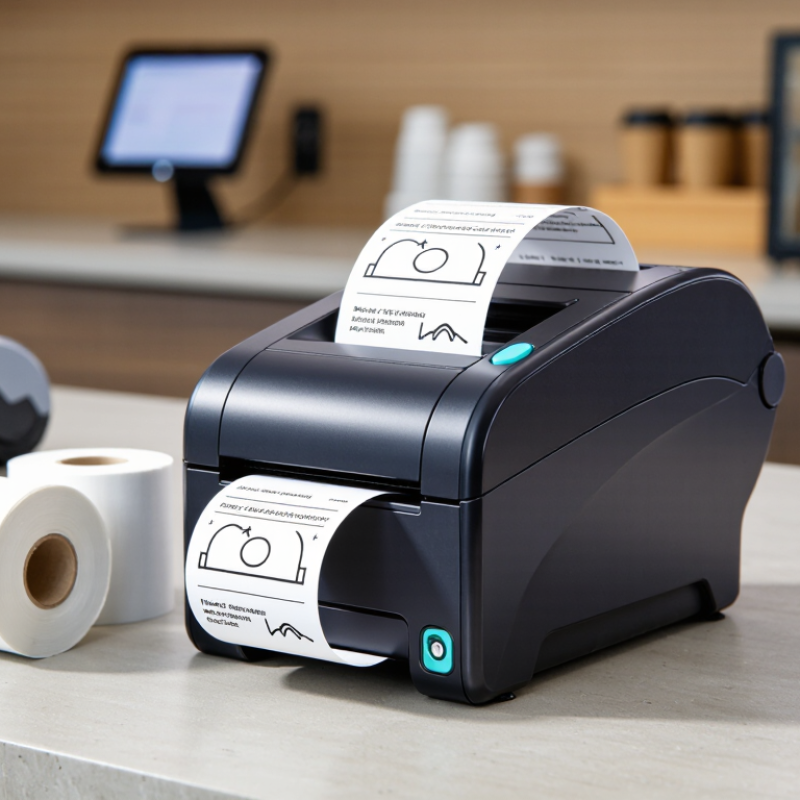
What Is a Thermal Receipt Printer?

What Is a Thermal Receipt Printer?

What Is a Thermal Receipt Printer?

A thermal receipt printer creates text and simple graphics by heating specially coated paper. Tiny elements in the printhead darken selected areas as the paper passes over them. No ink cartridge is needed. These printers are quiet and require few routine supply changes. Most receipt models use direct thermal printing, which does not use a ribbon.

Print speed depends on the printer, paper width, and receipt content. A short payment slip may print in seconds. Receipts can show item names, prices, taxes, and small graphics. The paper roll must be loaded in the correct direction; otherwise, the printer may produce a blank receipt. It is an easy mistake. Thermal paper can also fade with exposure to heat, light, or friction.

Tips: Store spare rolls in a cool, dry place. Use the paper size specified for the printer, and follow its instructions when cleaning the printhead. Check a test receipt after changing a roll. For records that need to stay readable for years, thermal paper may not be the best choice. Storage conditions matter more than many users expect.

How Thermal Receipt Printing Works

What Is a Thermal Receipt Printer?

How Thermal Receipt Printing Works

A thermal receipt printer creates text and images by applying heat to specially coated paper. Most receipt models use direct thermal printing, so they need no ink or toner. No cartridge is involved. The paper’s coating darkens where it receives heat, forming letters, prices, and small graphics.

Inside the printer, a row of tiny heating elements sits against the paper. The printer converts receipt data into a pattern of dots, then heats selected points as a motor feeds the paper forward. A roller keeps the sheet moving evenly beneath the print head. On a busy counter, this process can produce a receipt in seconds, with little noise and few moving parts.

The result depends on both the printer settings and the paper. If the print head is dirty, faint gaps may appear in letters or barcodes. Uneven pressure can also make one side look lighter. Direct thermal receipts may fade faster when exposed to heat, sunlight, or friction, so they are not ideal for every long-term record. That trade-off is easy to overlook. A quick test with the actual paper can reveal whether small text remains clear and readable.

Main Components of a Thermal Receipt Printer

What Is a Thermal Receipt Printer?

Main Components of a Thermal Receipt Printer

A thermal receipt printer forms text and graphics by applying heat to specially coated paper. Its thermal print head contains tiny heating elements arranged in a line. As paper passes beneath them, selected elements heat the coating and create dark marks. No ink cartridge is needed. The paper itself is part of the printing process, so using the wrong type can produce faint or uneven receipts.

The platen roller sits opposite the print head. It grips the paper and moves it through the print path while helping maintain steady contact. Small parts matter. Uneven pressure or a worn roller may leave pale streaks. In practice, diagnosing a light strip is not always straightforward: dust on the head, roller wear, and unsuitable paper can look similar. Cleaning and checking the paper path can help, but symptoms do not always point to one cause.

A paper sensor detects the roll’s presence or marks that indicate gaps between receipts. The control board processes print instructions and coordinates the head, feed motor, and other components. Some printers also include an automatic cutter, which trims each receipt after printing. Not every model has one. If cutting becomes inconsistent, paper alignment and blade wear are worth checking; the cutter is only one piece of the system.

Types of Thermal Receipt Printers

A thermal receipt printer uses controlled heat to form text and images on specially coated paper. Its types differ by printing method, size, and work setting. Direct thermal models are common at checkout counters. A heated printhead darkens the paper, so no ink cartridge is needed. The print is quiet and quick. But sunlight, friction, and hot storage can fade it. That limitation is easy to overlook.

Desktop printers sit beside tills and handle steady transaction volumes. Mobile models run on batteries and suit delivery desks or outdoor sales. Kiosk printers fit inside self-service machines, often with a cutter and paper sensor. Thermal-transfer models use a ribbon to move ink onto paper. They are less common for receipts, but can suit applications needing longer-lasting print. For everyday receipts, direct thermal is usually simpler.

Tips: Match printer size to counter space and expected print volume. Check paper width, connection options, and cutter access before buying. A common misjudgment is choosing only by speed; paper durability matters too.

Common Uses and Limitations of Thermal Receipt Printers

A thermal receipt printer forms text and barcodes by heating coated paper, rather than using ink. At a busy checkout, it can print receipts quickly with little routine maintenance. Shops, cafés, parking kiosks, and delivery counters use these printers for receipts, queue tickets, and order slips. No ink cartridge. Staff can replace a paper roll in seconds.

The demand is substantial: Grand View Research valued the global thermal paper market at about USD 4.3 billion in 2023 and forecast 5.2% annual growth from 2024 to 2030. That figure reflects paper demand, not proof that every business needs a thermal printer. These devices work well for short, immediate records. Kitchens use them for order tickets, while mobile sellers value compact models. The trade-off is easy to underestimate.

Printed text can fade with heat, sunlight, friction, or age. A receipt left in a hot car may become unreadable. Most models print in monochrome, so they are poor choices for color-coded instructions or detailed graphics. Paper roll width and printer compatibility also matter; the wrong roll can interrupt a shift. For long-term records, a digital copy is usually safer, though it still needs sensible backup practices.

What Is a Thermal Receipt Printer? — Common Uses and Limitations
Dimension Details Practical Consideration
How it works A direct thermal receipt printer uses a heated printhead to create text and images on heat-sensitive paper. It does not require ink or toner. The paper itself reacts to heat to form the printed image.
Common uses Retail and hospitality receipts, queue tickets, order slips, parking tickets, and some shipping or service-counter documents. It is most suitable for short documents produced quickly at a point of sale or service.
Typical paper widths Common roll widths include approximately 58 mm and 80 mm, though supported sizes vary by printer. Check the printer’s specifications and the application’s receipt layout before choosing paper.
Advantages Printing is generally fast and quiet, and there are no ink or toner cartridges to replace. Fewer consumables can simplify routine operation, although paper rolls still need regular replacement.
Print durability Thermal images can fade over time, especially when exposed to heat, strong light, friction, or certain chemicals. For long-term records, consider a more durable printing method or make a digital copy.
Color and output Most receipt printers produce monochrome output, usually black text on light paper. They are not a good choice when full-color graphics or photo-quality output is required.
Paper requirements Direct thermal printers require compatible heat-sensitive paper rather than ordinary office paper. Paper grades differ in image quality and durability. Store rolls away from excessive heat and direct sunlight.
Maintenance The printhead and paper path can collect dust or residue, and the printhead is a wear component. Follow the equipment instructions for cleaning and avoid abrasive materials that could damage the printhead.
Connectivity and compatibility Depending on the model, connections may include USB, Ethernet, serial, or Bluetooth. Confirm that the printer supports the required device, operating system, connection type, and receipt software.
Best-fit summary A practical option for frequent, short-lived receipts and tickets where speed and simple consumables matter. Less suitable when documents must remain legible for many years or withstand heat, light, and handling.
Go to Top